
Mobile App Optimization & Indexing
 Samuel Edwards
All of the insights I’ve shared thus far have been relegated to optimizing websites for mobile browsers, but there’s another form of user interaction on mobile devices you should be preparing your business for: mobile apps. Mobile apps have surged in popularity, just as mobile devices have, and there’s no sign that their growth has an end point. In fact, mobile apps are responsible for much more mobile use than web browsers, shaping how users interact with brands in a mobile application environment. For marketers and mobile app teams, this shift is a crucial role moment: the way people discover, open, and continue using apps is now central to long-term growth.
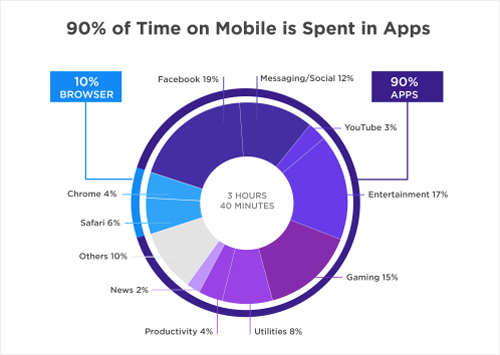
(Image Source: SmartInsights)
To address this, Google’s been implementing a number of functions and updates for what’s becoming known as “app SEO,” including the basic presence of mobile apps in search engines, app deep linking to take users to specific screens within apps downloaded on their devices, and even app streaming, which allows users to access apps they haven’t downloaded. These capabilities improve an app’s discoverability and app's visibility in search, giving your brand more chances to show up when prospective customers are searching for solutions in a competitive app marketplace.
It’s not entirely certain whether mobile apps may one day replace traditional websites, but they are becoming more important and they’re presenting more opportunities for marketers. Keep a close eye on their development as you fine-tune your strategic approach for mobile users. The brands that win will combine technical indexing with app optimization and mobile app optimization best practices—because mobile app optimization important work isn’t just about ranking. It directly affects user experience, user engagement, and user retention, especially as real-world user behavior shows how quickly people abandon slow or confusing experiences.
The App Indexing API
Google offers a specific, easy-to-integrate API that will ensure your app is seen and indexed by its search algorithm. However, Android and iOS apps are treated a little differently. Namely, for Android apps, if a user searches for a term specific to your app and has not yet downloaded it, he/she will see it appear in mobile search results. Those who already have the app installed will get Google autocomplete suggestions, along with deep links to content within the app. For iOS, things are a little less beneficial; mobile search visibility only applies for users who have already downloaded the app.
Either way, applying the app indexing API is relatively simple. You can think about it in three steps:
- Make sure HTTP deep links are supported in your app—there are different ways to do this for Android and iOS apps, but I’ll dig a little deeper into that below.
- Directly implement Google’s app indexing API, which they conveniently offer to developers.
- Use rel=alternate link elements or a Schema markup to map various web pages to their app-based counterparts, so Google can gain a better understanding of your app.
That being said, Android and iOS apps do require a bit of a different approach. And because user behavior data in apps is richer than on the web, tying indexing to measurement lets you analyze user behavior across the full user journey—from discovery to activation to retaining users.
Android App Indexing
To get your Android app’s content properly indexed:
- Add intent filters to your manifest so you can dictate how your app will respond to different types of user actions. Action, category, and data tags are the most important. This will allow for HTTP deep links, which is a requirement for app search visibility.
- Use Google’s Search Console to associate your app with your site. This will ensure that Google knows your brand is in control of both your mobile app and your primary domain (and will associate the two).
- Use the app indexing API provided by Google. They give detailed instructions on how to do this correctly.
- Run a test. Fetch as Google to make sure you’ve implemented these steps correctly.
From an optimization angle, Android is also where performance work shows up fastest. If app performance lags—think slow startup time, long app load time, or hidden performance issues—you’ll see it in your key performance metrics almost immediately. Real-world user behavior tends to be unforgiving: when load times creep past more than three seconds, users abandon the flow, users drop at key drop offs, and overall user experience suffers.
iOS App Indexing
For iOS, the process is a little different:
- Use the “universal links” option to enable HTTP deep link support. If you need help with this step of the process, Google offers a handy guide for developers.
- Use Google’s app SDK to register your app with Google. This will make sure Google recognizes and properly associates your app with an existing website.
- Run a test. Fetch as Google to make sure you’ve implemented these steps correctly.
Because iOS visibility leans heavily on installed-user discovery, improving the in-app journey matters even more. Small friction points—unclear intuitive navigation, inconsistent responsive layout across different screen sizes, or missing visual feedback—can reduce users engaged moments and impact engagement and retention over time. Pair indexing with a data driven measurement loop so you can spot where users navigate, where users tap, and where users active sessions fade.
Monitoring App Performance and User Behavior (Optimization that keeps users)
Indexing gets people in the door; mobile app optimization keeps them there. To monitor mobile app performance, your mobile app analytics setup should track app performance and mobile app performance in real time. Use analytics tools to watch key metrics like crash rate, latency from network requests, and stability signals such as crash reports. If you see app crashes, memory leaks, or other performance bottlenecks, prioritize fix bugs and improve performance before doing a full rollout of new releases.
From there, optimize engagement loops. Thoughtful push notifications and well-timed in app messages can enhance user engagement without overwhelming users, guiding them back to the moments that matter. Combined with usability tests and a smooth onboarding process, these improvements create a seamless user experience and an enhanced user experience that lifts user satisfaction, supports user retention, and helps you stay competitive as expectations rise.
Apps Without a Corresponding Website
You may have noticed that one of the biggest parts of implementing app indexing is associating an app with a particular website. So what happens if your app has no corresponding website? Unfortunately, do to Google’s current structures and limitations, it is not possible to index your app. However, they are working on developing a new way to index and display app-only content. In the meantime, app-only brands should focus hard on app store optimization to compete in app stores. Strong app store rankings depend on relevant keywords, clear app icons, and a compelling listing that highlights your key features for the right target audience. This is where “app SEO” meets classic ASO, and it’s how app-first businesses keep their app discoverable even before indexing expands.
If you’re interested in being one of the first volunteers for the feature, you can use this form to apply.